








FAQ

 Why do I need to check the md5sum values, and how can I check it? (Windows system)

NGS data tend to have a large files size which makes them more likely to be corrupted during file transfer.
So it's important that you check the md5sum of the files after receiving them to make sure what you
received are what we gave.
So it's important that you check the md5sum of the files after receiving them to make sure what you
received are what we gave.
 Checking md5 hash in a Windows system
Windows does not provide a program for checking md5sum by default. An external program such as QuickHash-Windows can be used instead.
STEP 1
Download QuickHash-Windows from the website, and unzip the file.
STEP 2
Take a look at the UserManual.pdf file inside the zip file, and execute the .exe file.

STEP 3
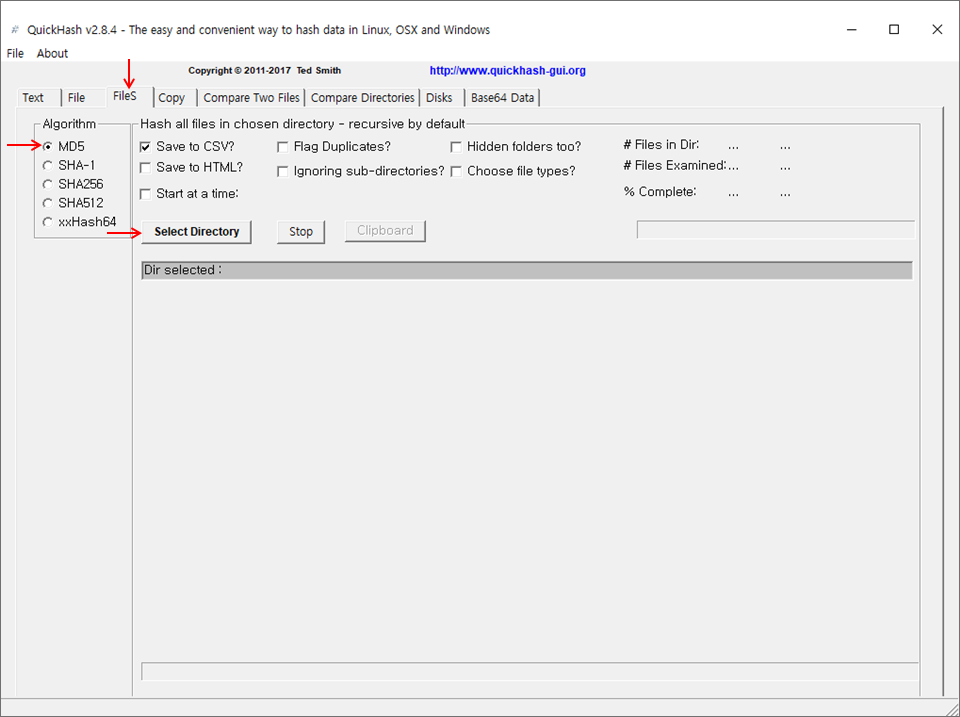
Click on the "FileS" tab, and select [MD5] as the Algorithm.
STEP 4
Click "Select Directory" and choose the directory where the files to be checked are located in.
The output can be saved as a csv or txt file.
The process may take some time depending on the performance of the system being used.
The output can be saved as a csv or txt file.
The process may take some time depending on the performance of the system being used.
STEP 5
Compare the newly calculated md5 value with the md5 value provided to you through
the Analysis Report.
the Analysis Report.
Why do I need to check the md5sum values, and how can I check it? (Linux system)
NGS data tend to have a large files size which makes them more likely to be corrupted during file transfer.
So it's important that you check the md5sum of the files after receiving them to make sure what you
received are what we gave.
So it's important that you check the md5sum of the files after receiving them to make sure what you
received are what we gave.
 Checking md5 hash in a Linux system
Linux systems have an internal md5sum program under /user/bin/md5sum.
md5sum has a "-c" option, which reads the md5 sums from the input file and checks them simultaneously.
STEP 1
Psomagen provides a text file containing the md5sum of deliverables you'll be receiving, which you can use to validate the integrity of the files.
You can download this file by clicking on the "md5sum List" button in the "Download List" page. The text file will have the following name and format:
○ Format : <OrderNumber>_#samples_md5sum.txt

○ You can also find "md5sum.txt" located alongside your delivered files.

STEP 2
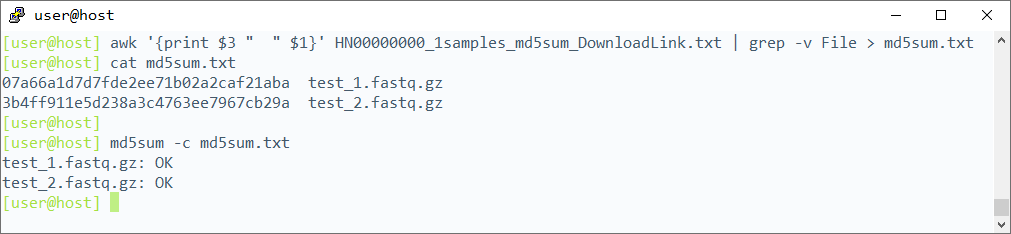
Use "md5sum -c" to validate the integrity of the file you've received. The input file for md5sum -c has to be delimited by two spaces with the md5sum column appearing before the file name, just like the sample image of "md5sum.txt" file shown above. As you can see, the two other files above are not formatted this way and need to altered to be used as input for md5sum -c. You can manually exclude the header and cut out "File" and "md5sum" column from the files, or simply run the following command:
$ awk '{print $3 " " $1}' <md5sum_file> | grep -v File
$ awk '{print $3 " " $1}' <md5sum_file> | grep -v File
STEP 3
"md5sum -c" reads the input containing the md5 value of a file, and checks whether the md5 value of that file matches what’s written inside the input file. This action outputs "OK" if the md5 value
matches, and "FAILED" if otherwise. Check if the command outputs "OK" for all the files. (Refer to image below)
I want to see the data produced by Psomagen. How can I open the files?
NGS data tend to have large file sizes, and are not user-friendly to work with in a Windows environment.
We recommend that you use Linux system for smoother operation.
We recommend that you use Linux system for smoother operation.
Where can I find information for Illumina adapter sequences?
Information on Illumina adapters can be found in this support document:
Adapter Sequences Intro
Adapter Sequences Intro
Order Information

 |
|
| Order Number |
Company location

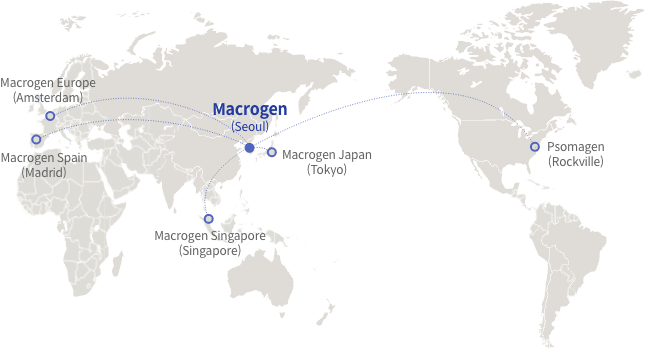
 Macrogen Inc.
(Headquarter)
Macrogen Inc.
(Headquarter)
|
|
[08511] 1001, 10F, 254 Beotkkot-ro, Geumcheon-gu, Seoul, Republic of Korea (Gasan-dong, World Meridian 1) T. +82-2-2180-7000 E1. ngs@macrogen.com(Overseas) E2. ngskr@macrogen.com Web. https://www.macrogen.com LIMS. http://dna.macrogen.com |
 Psomagen
(Macrogen USA)
Psomagen
(Macrogen USA)
|
|
1330 Piccard Drive, Suite 103, Rockville, MD 20850, United States T. +1-301-251-1007 E. inquiry@psomagen.com Web. https://psomagen.com |
 Macrogen Japan
|
|
16F Time24 Building, 2-4-32 Aomi, Koto-ku, Tokyo 135-0064 JAPAN T. +81-3-5962-1124 E. ngs@macrogen-japan.co.jp |
 Macrogen Singapore
|
|
3 Biopolis Drive #05-18, Synapse, Singapore 138623 T. +65-6339-0927 E. info-sg@macrogen.com |
 Macrogen Europe
|
|
Meibergdreef 57, 1105 BA, Amsterdam, the Netherlands T. +31-20-333-7563 E. ngs@macrogen.eu |
 Macrogen Spain
|
|
Av. Sur del Aeropuerto de Barajas, 28, Office B-2, 28042 Madrid, Spain T. +34-911-138-378 E. info-spain@macrogen.com |
Copyright ©
Research Use Only.